Host analytics that connect assignments, occupancy, and team health
Move past gut feel: filter by date and property, read acceptance and response-time trends, see assignment mix across primary, backup, and (on Pro and Business) marketplace, and catch iCal sync drift before bookings go missing. Advanced analytics is included on Starter, Pro, and Business; cleaners get a focused monthly performance snapshot.
Access
Who sees what
Hosts and operators on Starter, Pro, or Business unlock advanced analytics: the full filter bar, trend charts, assignment funnel, and extensive metrics backed by workspace-scoped data. Free workspaces see an upgrade path in the app — the product surfaces what you unlock when you move up.
Cleaners use the same Analytics entry for a lighter experience: this month’s earnings and jobs completed, average pay per job where data exists, response time, on-time rate, and star ratings — optimized for “how am I doing?” without host-only portfolio charts.
Snapshot
Overview tiles and smart nudges
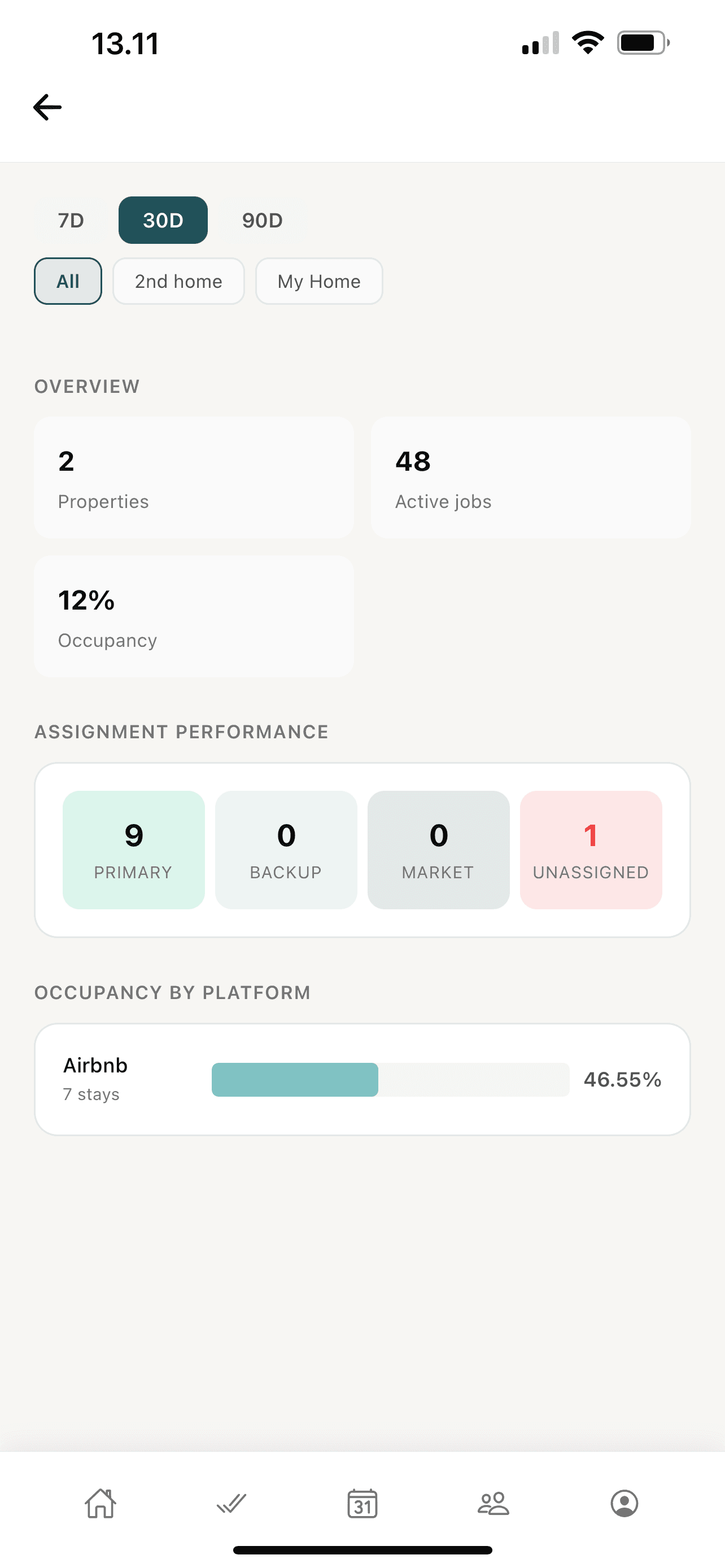
At the top of the host view, Oordio summarizes what matters for the selected window: property count, active jobs, occupancy (when calculable), and overall offer acceptance rate. Acceptance is color-highlighted when it is strong or when it needs attention — for example when many offers expire relative to sends, which often points to backup coverage or window tuning.
Short insight cards translate raw numbers into plain language: “strong acceptance,” “many offers expired — consider shorter windows or more backup capacity,” or team nudges when a cleaner’s average response drifts high.
Operations
Assignment performance and offer funnel
A horizontal funnel shows how work flowed through primary, backup, and marketplace stages, plus how many jobs still landed unassigned. That mirrors the relationship-first ladder you configure per property — analytics makes the pattern visible across weeks, not just job-by-job.
The offer funnel trend stacks accepted, declined, and expired offers over time so you can correlate policy changes or staffing changes with cleaner behavior. Pair it with How it works for the rules behind each stage.
Speed
Response time and cleaning duration
Response time trends plot how fast cleaners accept offers after they are sent — with averages, medians (p50), and sample counts so you trust the curve. Slow acceptance is often the earliest signal that a relationship is overloaded or that windows are misaligned with real life.
Cleaning duration trends look at time-to-complete on finished jobs — useful when scheduling tight turns or comparing properties with different sizes and standards. Both charts respect your selected date range and property filter.
Mix
Spend by property, occupancy by platform, cleaner leaderboard
On Business, when financial exports are enabled, a spend-by-property horizontal view shows where cleaner compensation concentrated in the window — with a shortcut into the Finance hub for line-item detail and CSV/PDF reporting.
Occupancy by platform breaks down booked nights and stay mix across connected channels (for example Airbnb vs iCal-fed sources) so you see channel dependence at a glance.
Cleaner performance ranks top cleaners by completed jobs in the period, with on-time and rating hints where data exists — a practical view for who is carrying the portfolio vs who may need a conversation.
Reliability
iCal sync health
For properties that rely on calendar feeds, Oordio surfaces per-property sync health: recent status, success counts over the last seven days, and enough context to spot a broken feed before guests show up to an unassigned turn. Analytics is the right place to monitor this weekly; the dashboard stays focused on today’s exceptions.
Business
CSV from Analytics
With financial exports (Business), hosts can trigger a CSV export from the analytics flow for cleaning-spend style data — in addition to the richer payout exports on the Payouts & reporting page in the app. Exports are scoped to the active workspace; switch workspaces before exporting if you operate multiple entities.
Frequently asked questions
Landlords, owners, and managers on Starter, Pro, or Business see the full host analytics experience: charts, filters, assignment metrics, and (on Business) spend views tied to exports. Cleaners see a simpler “this month” view with earnings, jobs completed, response time, on-time rate, and ratings — no host subscription required for that cleaner summary.
Next steps
Pair analytics with operational pages so insights turn into action: tighten backup coverage, adjust acceptance windows, or dig into payouts when spend concentrates on one property.
Ready to run calmer turnovers?
Start in the web app, or download on iOS and Android.